
Best Cassette to CD and MP3 transfer in
Manhattan, New York, NY.
|
|||||||||||||||||||||||||||||||||||||||||||||||||||||||||||||||||||||||||||||||||||||||||||||||||||||||||||||||||||||||||||||||||||||||||||||||||||||||||||||||||||||||||||||||||||||||||||||||||||||||||||||||||||||||||||||||||||||||||||||||||||||||||||||||||||||||||
|
Index
We understand the importance of your Cassette tapes.
Cassette Tape to Digital File Conversion |
|||||||||||||||||||||||||||||||||||||||||||||||||||||||||||||||||||||||||||||||||||||||||||||||||||||||||||||||||||||||||||||||||||||||||||||||||||||||||||||||||||||||||||||||||||||||||||||||||||||||||||||||||||||||||||||||||||||||||||||||||||||||||||||||||||||||||
Audio Cassette Tape to CD
or MP3 transfer services.
|
|||||||||||||||||||||||||||||||||||||||||||||||||||||||||||||||||||||||||||||||||||||||||||||||||||||||||||||||||||||||||||||||||||||||||||||||||||||||||||||||||||||||||||||||||||||||||||||||||||||||||||||||||||||||||||||||||||||||||||||||||||||||||||||||||||||||||

 At Doi Camera, all Cassette copy services will be processed in house at our NYC studio.


 Audio
tape conversion done in house at Manhattan, New York,
NY Lab.
Audio
tape conversion done in house at Manhattan, New York,
NY Lab. 
 Your tapes stay at our New York Lab throughout the process.


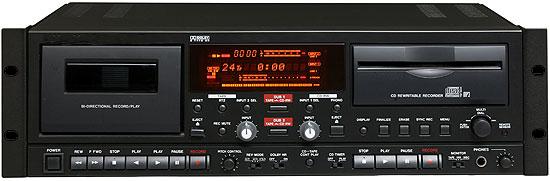 |
|---|
| One of our main equipment for audio cassette to CD conversion |
.
| Please Note for our audio cassette conversion services. We don't split tracks We are not offering track cutting for each song or conversation. The whole one side of a cassette tape will be a single track on an audio CD.
Turn
around time: How
to place an order with us:
|
|||||||||||||||||||||||
 Copy Cassette tape to CD - New Lower
Prices
Copy Cassette tape to CD - New Lower
Prices |
|||||||||||||||||||||||
|
|||||||||||||||||||||||
 |
These quantity discounts apply
to Regular Cassette Tapes only. No equality discounts for Micro cassette or Mini Cassettes transfers.
|
||||||||||||||||||||||
|
|
These discounts are based on the
quantities of the original tapes.
|
||||||||||||||||||||||
|
|
A 60 minutes or shorter cassette tape will go on to a single audio
CD with two tracks or
|
||||||||||||||||||||||
|
Your original cassette tape(s) will be returned.
|
||||||||||||||||||||||
|
|
Audio CD order: An additional copy of audio CD is $7.95
|
||||||||||||||||||||||
|
|
MP3 order: Audio CD and MP3 file order; MP3 file on a Flash Drive: Please feel free to inquire for more detailed cost about your order
|
||||||||||||||||||||||
|
|
RUSH Cassette to CD transfer service
will be available at 100% up(double the price). Please ask us before bringing the tape in to our store. |
||||||||||||||||||||||
|
|||||||||||||||||||||||

Micro cassette tape to CD transfer
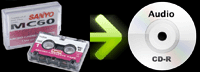
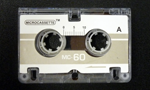
Convert Micro cassette tape to CD.
 |
 |
.jpg) |
Our price is very simple and straightforward. All inclusive except tax.
No Scanning fee or Transfer fee or Output fee nor Media fee or etc.
We will charge you based on Actual Recording Time of a Micro cassette tape.
A Micro cassette tape with actual recording time shorter than 60 minutes: $15.95
A Micro cassette tape with actual recording time longer than 61 minutes: $15.95 per an hour.
Note: Micro cassette tape recorded in LP mode
Micro cassette tape can be recorded in LP mode which makes its recording time double the time of what is
written on the tape.
ex. MC-90 tape can be 1.5 hour recording (SP mode) or 3 hour recording (LP mode).
No quantity discounts due to intensive handling care for Micro cassette tapes.
| Note: | |||||||||||||||||
|
Micro cassette has two recording speeds.
No quantity discounts because we have to handle one by one very carefully.
Audio CD order: MP3 order: Audio CD and MP3 file order: MP3 file on a Flash Drive: Please feel free to inquire for more detailed cost about your order
|
||||||||||||||||
|
Mixed Speed Recording
|
||||||||||||||||
|
Micro cassette recorder is not as accurate recording device
as regular cassette player, because
|
||||||||||||||||
|
Your original cassette tape(s) will be returned.
|
||||||||||||||||
|
A 60 minutes or shorter cassette tape will go on to a single audio
CD with two tracks or
|
||||||||||||||||
|
An additional copy of audio CD is $7.95
|
||||||||||||||||
|
RUSH Cassette to CD transfer service
will be available at 100% up(double the price). Please ask us before bringing the tape in to our store. |
||||||||||||||||


Turn
around time:
All audio cassette tape conversions are processed in house at
our New York Lab, so the turn around time is very quick.
Copy a Micro cassette tape to CD could be done in a day or two..
Same day or a couple of hours Rush transfer service will be
available with 100% extra fee ($31.90 per tape). Please ask
us for availability.
Multiple
tapes may take longer.
Note that all audio conversion will be
processed here in Manhattan, New York City.
There is absolutely no chance that your tapes would be lost
or damaged on transpiration.
How
to place an order with us:
 How
to place an order with us.
How
to place an order with us.
Mini Cassette to CD
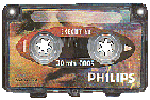
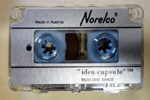
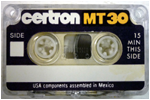
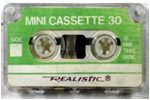
Mini Cassette tape is a small audio cassette
tape developed by Phillips.
The mini cassette was sold under brand names of Philips
as well as Norelco, Realistic and others.
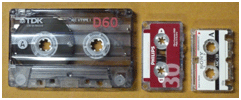
The size of the mini cassette is similar to Micro cassette but
slightly larger than Micro cassette
The Mini Cassette tape measures 2 3/4 inches
x 1 1/2 inches (55 mm x 35 mm).
A Micro cassette tape measures 2 x 1 1/4 (50 mm x 35 mm).
If you see Philips or Norelco brand on a small cassette tape,
it must be a "Mini Cassette Tape"
 |
 |
 |
 |
|
|
Regular Cassette / Mini / Micro |
 |
Transfer Mini Cassette tape to CD
Price
Our price is very simple and straightforward. All inclusive except tax.
No Scanning fee or Transfer fee or Output fee nor Media fee or etc.
We will charge you based on Actual Recording Time of a Mini cassette tape.
A Mini cassette tape with actual recording time shorter than 60 minutes: $15.95
A Mini cassette tape with actual recording time longer than 61 minutes: $15.95 per an hour.
Note: Mini cassette tape recorded in LP mode
Mini cassette tape can be recorded in LP mode which makes its recording time double the time of what is
written on the tape.
ex. MT-90 tape can be 1.5 hour recording (SP mode) or 3 hour recording (LP mode).
No quantity discounts due to intensive handling care for Mini cassette tapes.
| Note: | |||||||||||||||||
|
Mini cassette has two recording speeds.
No quantity discounts because we have to handle one by one very carefully.
Audio CD order: Audio CD and MP3 file order; Please feel free to inquire for more detailed cost about your order
|
||||||||||||||||
|
Mixed Speed Recording
|
||||||||||||||||
|
Mini cassette recorder is not as accurate recording device
as regular cassette player, because
|
||||||||||||||||
|
Your original cassette tape(s) will be returned. | ||||||||||||||||
|
A 60 minutes or shorter cassette tape will go on to a single audio
CD with two tracks or two MP3 files. First track for side A and another track for side B. A cassette of 90 minutes or 120 minutes will be converted to a set of two audio CD's or two MP3 files. One CD for side A (one track) and another CD for side B (one track). The price per original cassette is the same with a single CD or a set of two CDs (flat rate). ex. A 60 minutes cassette - you will get a single audio CD at $15.95. A 90 minutes cassette - you will get a set of two audio CDs at $15.95 ($15.95 for a set, not per CD). |
||||||||||||||||
|
An additional copy of audio CD is $7.95
|
||||||||||||||||
|
RUSH Cassette to CD transfer service
will be available at 100% up(double the price). Please ask us before bringing the tape in to our store. |
||||||||||||||||
Turn
around time:
All audio cassette tape conversions are processed in house at
our New York Lab, so the turn around time is very quick.
Copy a Mini cassette tape to CD could be done in a day or two..
Same day or a couple of hours Rush transfer service will be
available with 100% extra fee ($31.90 per tape). Please ask
us for availability. Multiple
tapes may take longer.
Note that all audio conversion will be
processed here in Manhattan, New York City.
There is absolutely no chance that your tapes would be lost
or damaged on transpiration.
How
to place an order with us:
How
to place an order with us.
Audio
Tape Copy ( Audio Tape dupe )
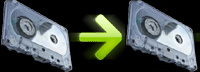
Audio cassette tape to Audio cassette tape copy
$29.95 per tape (up to 120 min).

DVD to MP3 (DVD Audio to MP3)
Convert DVD to MP3, Convert Video to MP3.
Disclaimer
Please respect Copy Right.
Under no circumstances, we will make soundtrack CD from commercially
made DVD video.
We will make an audio CD (or MP3 files on a CD) from your DVD
video.
In other word, we will take out audio part from your DVD video
and make a music CD.
DVD to MP3 is a good idea for listening to a video taped lecture,
party, wedding, class, meeting or testimony.
Audio CD can be played on boom box, CD player or PC/Mac computer.
The MP3 files can be listened to on iPod, iPhone or other MP3
players.
Price is $29.95 per DVD.
|
| How can I play the audio CD you created? |
|
You can play audio CD and enjoy music in many ways:
|
 How can I play the audio CD on iPad, iPhone or iPod?
 |
|
The audio CD that we created from you cassette tape can
be handled as a regular music CD.
|
 Can you put a cassette tape in to my iPod, iPad or iPhone?
 |
|
Unfortunately we can't, because it has to be done through
your iTunes on your computer. To learn more about transferring an audio CD through iTunes, please go to Apple's tutorial site.
|
| How long does it take to have my cassette tape converted to CD? |
|
We are pretty quick in general.
|
| Is there any charge for a Blank tape? |
|
No.
|
| What format of music file am I getting on the CD? |
|
.cda file, which is a music audio
CD format.
|
| Why do you recommend Audio CD, not MP3 files? |
|
Because Audio CD is much better quality than MP3 files.
|
| Can you transfer a longer than 1 hour cassette tape to a single audio CD? |
|
No we can not.
|
| How long cassette tape can be transferred to a single audio CD? |
|
60 minutes (practically up to 70
minutes).
|
| Will my original cassette tape be returned to me? |
|
Yes.
|
| I am concerned about my tape's privacy and confidentiality. |
|
We respect your privacy and confidentiality seriously.
|
| Do you convert copy protected cassette to CD? |
|
Absolutely not.
|
| Can you transfer multiple cassette tapes on to a single CD? |
|
No, we don't offer any editing services.
|
| Will the audio CD you create play on my CD player (and a Boom box)? |
|
Yes.
|
| Will the CD you create play on my PC or Mac? |
|
Yes, it will work on your computer
if your PC/Mac has a CD/DV drive.
|
| Can you transfer a portion of my tape to CD? |
|
No. We do not offer any editing services.
|
| Is there any Regional code protection on the CD? |
|
No.
|
| How can I edit the audio CD? |
|
Disclaimer
|
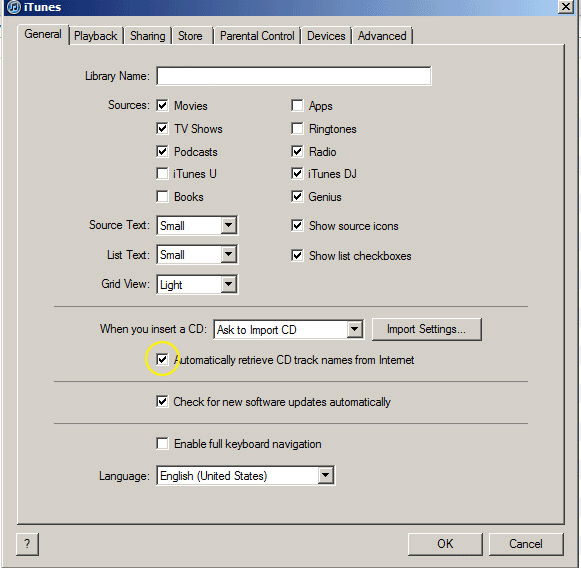
| iTunes shows weird CD title when I insert the audio CD in. |
|
Depends on your iTunes preference setting, you might see
a strange music CD title pops up when you insert an audio
CD.
|
| Transcription service - Can you make "print" from cassette tape? |
|
Unfortunately we are not offering transcription services.
|
|
|
 Other
questions? Other
questions? |
| Please contact us with your question. |


|
|||||||||||||
 |
|
|
|
|
DOI Camera, NYC: Site
Map |
|||
|
Store Information |
ID Photos |
Digital Conversion |
Scan |
Doi Camera
Since 1971 in Midtown Manhattan, New York City, NY
All rights reserved.